The six layers
Validate · Evidence · Review · Identify · Fact-check · Yield. What Verify checks, what the ODI score means, and when it goes stale.
Turn it on
Orient settings › Verify — Layer 2 VERIFY on this turn → on: Claim-by-claim semantic check this turn. It also runs from the Verify tab on any page. Review actions marked GROUNDED run it as part of their work.
The six rows
| Layer | Question it answers |
|---|---|
| Validate | Is the text well-formed for its purpose — structure, required sections, no placeholders? |
| Evidence | Does every claim that needs a source have one, and does the source resolve? |
| Review | Does it meet the review rules for its type — fair balance, no promotional language, regulatory register? |
| Identify | Are entities, products, indications and numbers consistent with the page and the record? |
| Fact-check | Do the sourced claims say what the source says — claim by claim? |
| Yield | Is the result usable — does it move the document to its next gate? |
The footer of the tab spells it out: VERIFY = VALIDATE · EVIDENCE · REVIEW · IDENTIFY · FACT-CHECK · YIELD.
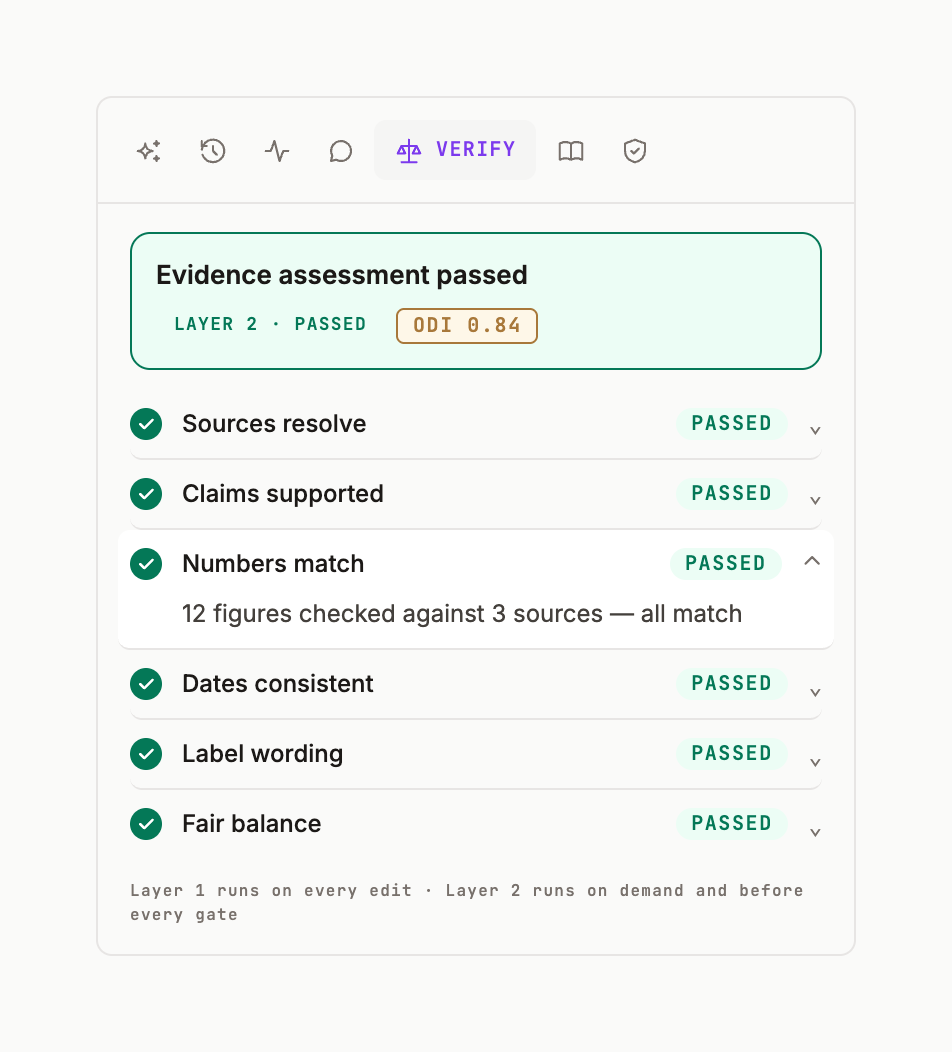
Reading the result
While it runs: Awaiting evidence assessment · LAYER PENDING · 6 PENDING. When done: LAYER 2 · PASSED (or the row that failed, with why) and the ODI badge — a 0–1 score of how well the document is defended on the evidence it cites. On an answer card the same result appears as the verification ribbon with chips Sources ✓ · Citations ✓ · Fair balance ! · MLR ○ (✓ passed, ! attention, ○ not run).
Stale
Any accepted edit marks VERIFY stale in the ledger. Re-run before a gate; the export names the version each result belongs to.