Consult 1:1
One named specialist, one answer you can trace. What happens between Run and Add to page.
Run
On the routing card, click Run on the recommended specialist. The thread shows a thinking trail — THINKING · Briefing <Specialist>… → Reading page for context → Composing answer — then the answer card.
The answer card
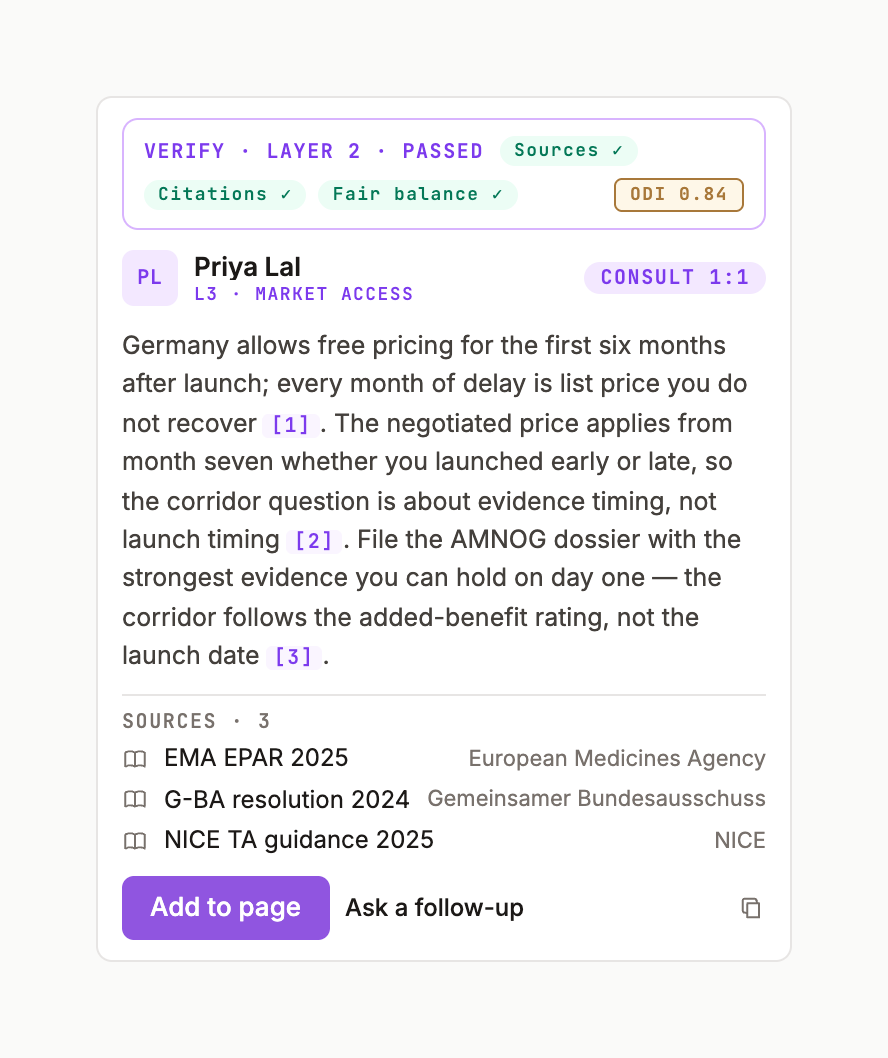
- Header: initials avatar, the specialist's name, chips
CONSULT 1:1andL4 · MARKET ACCESS & PRICING(level · department), and aSTREAMINGpill while live. - Body: streams in, with
[n]citation chips on each sourced claim. SOURCES · nstrip: title and domain per source; click through to the Sources tab.- Verification ribbon when Verify is on for the turn:
VERIFY · LAYER 2, chips Sources ✓ · Citations ✓ · Fair balance ! · MLR ○, and the ODI score. - Action row: Add to page · Apply to page · Compose · copy · thumbs.
Add it to the page
Add to page writes the answer under your cursor with the Chief of Staff caret, as pending blocks — you'll see the grey highlight until you accept — and the toast Added to page. Activity records consult added · <Specialist> · CONSULT.
Follow up
Reply in the same thread and the specialist keeps the context of the page and its earlier answer. Threads are listed under Conversations › LINKED THREADS.
Price
A 1
consult is 10 credits, shown on the card before you click. Credits.Was this page useful?