Your first signed deliverable
One page, its runs, its evidence, and a signature you can defend in front of your client.
A page with a real question, at least one run read with its sources, and one person named as reviewer (you can be both, this week).
Open the page that answers the question. Add to page every run that belongs to it; keep the references.
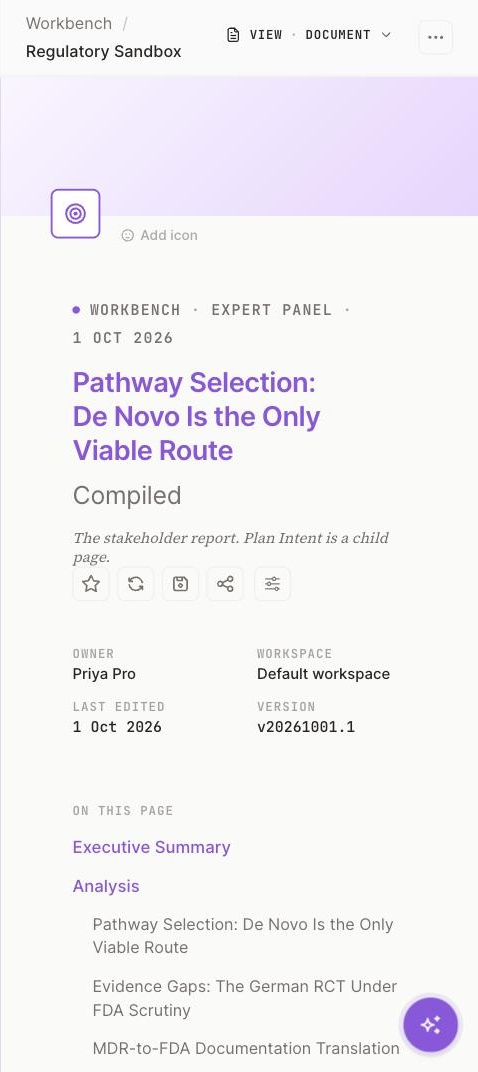
1 The page carries the run.2 Owner, workspace, version.3 On this page: the run's sections.
Screenshot 10 · The page with its runOpen this screen → Write the recommendation in your own words above the evidence, three paragraphs at most: what you decided, on what, and what stays open.
Open COMMENTS and leave one note for the reviewer on the point you are least sure of. That note is part of the record.
From the page ⋯ menu, mark the page as the deliverable, then ask the reviewer to approve it in GATES.
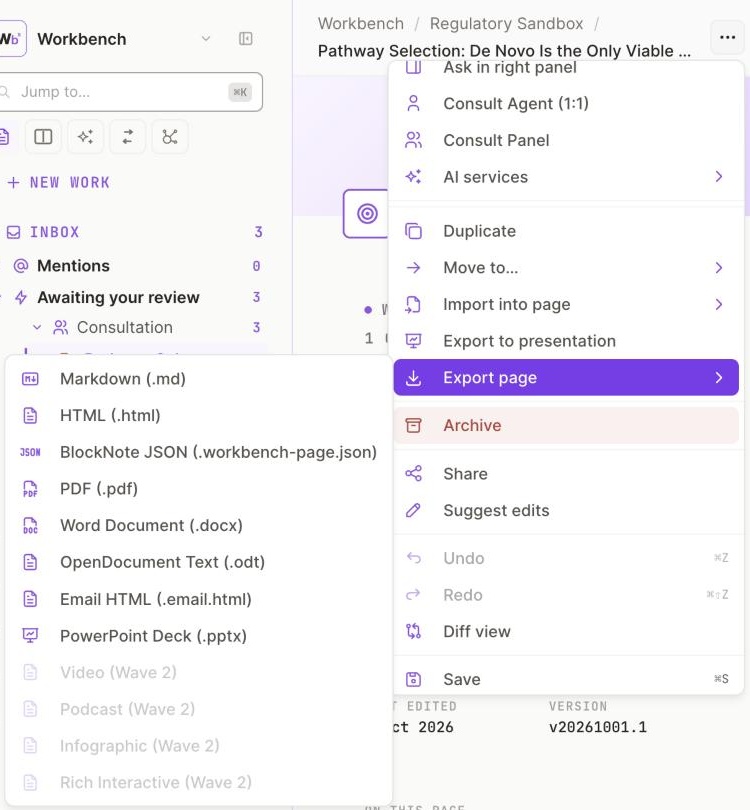
1 Export page: eight formats.2 Import into page.
Screenshot 11 · The ⋯ menu, and GATESOpen this screen → Step 1 of 2From the page ⋯ menu, mark the page as the deliverable, then ask the reviewer to approve it in GATES.When it is approved, the page carries the review record: who decided, on what evidence, what was disagreed with.
The page with a Deliverable label, its version, and the approval in GATES. The Chief of Staff's note on the Hub congratulating you on the first one.
If the ⋯ menu has no deliverable action yet, write "Deliverable" as the first line of the page and approve it in GATES; the label will follow when the action ships.
Follow your credits before the month renews (Guide 6).